
Conference Calling
Included With Pro Upgrade
Fongo Works’s conference calling service is the only way to have multiple people on one call. You can call into the conference call using any device and include participants from outside of your Fongo Works system. You can have up to 30 Participants with a maximum call length of 4 hours.

Setting Up A Conference Call
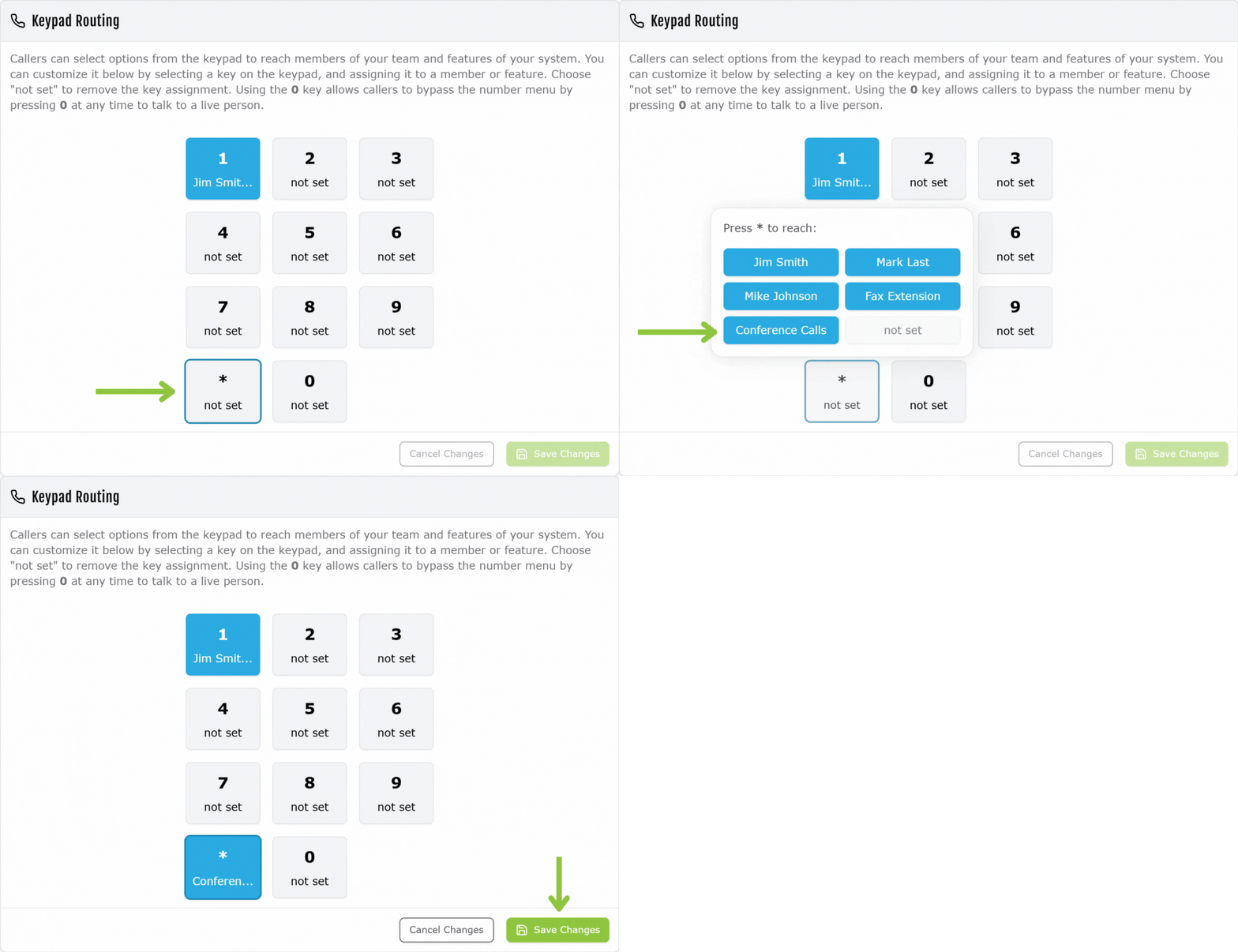
Keypad Routing
- Sign into the Fongo Works Dashboard
- Click on the Caller Options tab
- Under the Keypad Routing section, select the caller option to be used to dial-in to the conference call
- Click Save Changes
Access Pin
- Sign into the Fongo Works Dashboard
- Click on the Dashboard tab
- Under the Conference Calling Access section, you’ll see the access PIN that callers need to enter after dialing into the conference call.
Joining A Conference Call
Fongo Mobile App Users
- Open your Fongo Works mobile app
- Open the menu (swipe left-to-right or tap the 3 lines in the left corner)
- Tap Conference in the menu
- The app will call into the conference call and automatically dial the entrance PIN for you
- After following all prompts, you will automatically be added to the call
Calling-In With Any Device
- Call the Fongo Works business phone number, then select the keypad option that is set to Conference Calls
- You will then be prompted to enter the PIN
- After entering the PIN, wait for further prompts.
- After following all prompts, you will automatically be added to the call
